
New Book
/ Edit Metadata
All the data that describes a book—its title, author, ISBN number, etc.—is referred to as metadata. Metadata is bundled invisibly in eBook code where it is used by eReader devices and eBookstores to sort books by subject, by author.
Making a new book involves entering a few required pieces of information, several optional facts and descriptions, and a cover image.
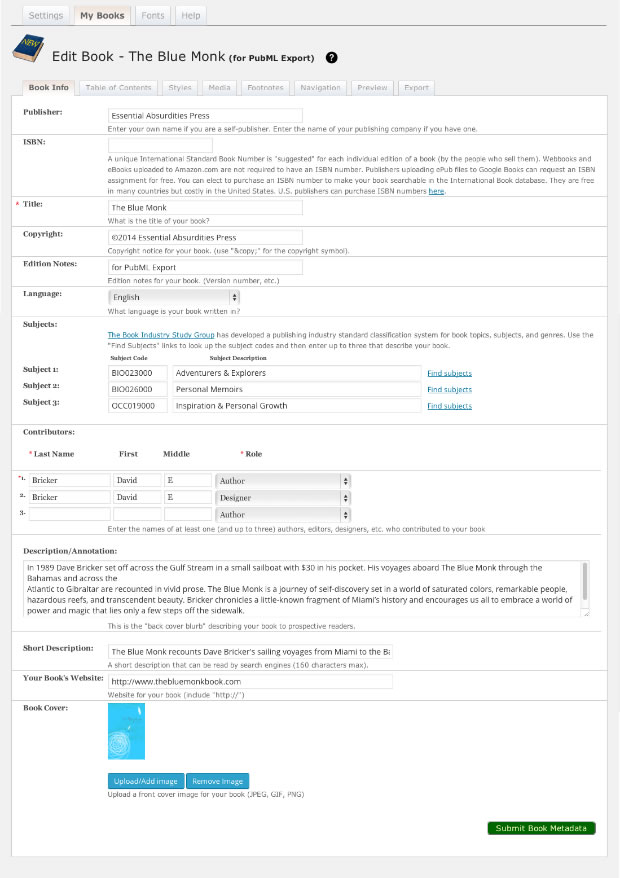
Most of the fields are self-explanatory but here’s a list of fields and descriptions:
Publisher
Use your name unless you own a publishing imprint or your book is published by a third party. If a traditional publisher has licensed your work, be sure to get permission to produce/release your own eBook version.Title
The full title of your book, including any subtitle.Copyright
Enter your release date or a formal date of copyright if you have one, along with the name of the copyright holder. This field contains the full copyright notice—not just the date (e.g. ©2014 ABC Press. All Rights Reserved)Edition Notes
Edition Notes are useful when you have multiple versions of the same book.For example, you may wish to embed images in a book intended for ePub export that you’d access online inside a book intended for <PubML>™ export. Or maybe you’re working on next year’s update of a currently published book? Edition notes will show up next to the book’s title in the various editing screens, confirming that the book you’re currently editing is “for <PubML>™ export” or is the “2015 edition.”
Language
Choose the language your book was written in from the dropdown menu.Subjects
The Book Industry Study Group has developed a standard classification system for books. Use the “Find Subjects” links to access the BISAC site. Copy and paste up to three subjects and category codes that describe your book.Contributors
Every book must have at least one contributor—usually the author. Additional contributors can include editors, designers, etc. Enter the names and roles of up to three contributors.Description/Annotation
This is the equivalent of the “back cover blurb”; it’s the text that describes what your book is about and who should read it. Use the “miniskirt rule”: long enough to cover the subject; short enough to keep it interesting.Short Description
This short description is used to control how your book appears in a list of search results. 160 characters max.Your Book’s Website
Enter a website into this field if your book or publishing imprint has a website you wish to include with the book’s exported metadata.Book Cover
Upload a cover image (GIF, JPEG, or PNG files are acceptable).
The dimensions of your cover image should match the width:height ratio of your book. For example, if your book layout is 6 x 9 inches, your cover image should have the same proportions (2:3). Consider that larger images load more slowly and bloat the file size of your exported book. Smaller images will lose quality when they’re enlarged for color screens. Ask your designer to help choose the best format and image size for your book.
After you enter your information, click the Submit Book Metadata button at the bottom right of the screen. This will return you to the My Books screen where your newly entered book should appear in the library.
You can always edit/update your books metadata by clicking the Edit Metadata link associated with your book’s listing in My Books.