
Styles > Background
<PubML>™ eBooks offer custom backgrounds and colors.
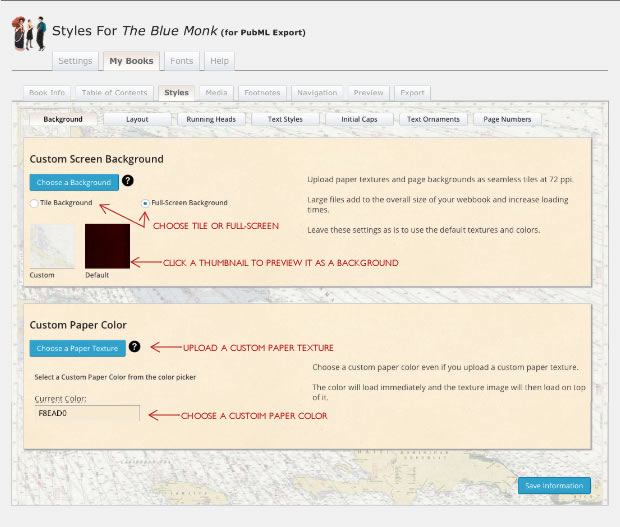
The Custom Screen Background fills the browser window behind the book. Upload a custom image and then specify "full-screen" to have that image cropped/stretched to fill the screen or "tile" to have the image repeat to fill thew background.
<PubML>™ offers one customizable background and a default "wood" texture that is not customizable from inside the <PubML>™ tools.
The Custom Paper Color screen allows you to select a color and texture for your book's "paper." The image may take a moment to load so choose a color that complements your paper texture to avoid a "white" flash behind the first page of text. Click the "Current Color" field to reveal a color picker.
Be wary of complex or highly contrasted images. These can make your text difficult to read. Upload a seamless tiled image or one larger than your paper size.
Your paper and background images will appear on the "Backgrounds" page and throughout the styles section.
Remember to click "Save Information" after making adjustments!